Business Process Automation Examples: 7 Workflows Worth Copying (and What They Actually Save)

Updated: Aug 13
Most companies know they should automate more. Few know exactly which processes to start with. This article covers seven workflows that consistently deliver measurable time savings in mid-size companies — with realistic implementation guidance and tool recommendations for each.
Ask most operations managers which processes they'd automate if they could, and the answer is usually vague: "the manual stuff," "the repetitive things," "the data entry." That's not a prioritization — that's everything.
The companies that make real progress on automation start with something more specific: a process that runs daily, follows clear rules, and costs a calculable number of hours per week. With those three criteria in place, the ROI question answers itself.
Below are seven business process automation examples that fit this description — drawn from projects with European mid-size companies across manufacturing, logistics, retail, and professional services.
What Makes a Process Worth Automating?
A quick decision test before we get to the examples. A workflow is a strong automation candidate when:

It's frequent. The process runs daily or multiple times per week — not once a quarter.
It follows rules. Every decision step is predictable. You could explain it to a new team member in thirty minutes and they'd handle it correctly without further guidance.
The cost is measurable. You can calculate: minutes per run × number of runs per month × internal hourly cost = monthly cost of the process.
When all three are true, the arithmetic is straightforward. A process that costs €3,000 per month in staff time can justify a €30,000 automation investment within a year — before you account for error reduction and scalability.
With that framework in place, here are seven processes worth examining in your own operations.

7 Business Process Automation Examples

1. Email Inbox: Sorting, Routing, and Attachment Management
What happens manually: Emails from customers, suppliers, internal teams, and automated systems all land in the same inbox. Someone opens each one, decides who handles it, forwards it or responds, saves attachments to the right folder, and sometimes creates a support ticket. Per email: 2–4 minutes. At 100 incoming emails daily: up to 7 hours of sorting work every day.
What can be automated:
Classify emails by sender, subject, or content type (order, complaint, invoice, inquiry)
Route automatically to the responsible person, team, or system
Detect, rename, and file attachments in the correct folder — or pass them directly to the ERP
Send pre-defined acknowledgment responses for standard request types
Realistic time savings: 2–5 hours daily at 80+ emails per day. For companies where email is the primary inbound channel, this is often the highest-ROI automation available. This is exactly the workflow Smart Dato Cockpit handles out of the box, as a ready-to-use product rather than a custom build.
Tool guidance:
Simple routing by sender/subject → Microsoft Power Automate or make.com handle this well
Content-based classification (beyond sender/subject rules) → AI-based categorization, either custom-built or via Azure AI/OpenAI API integration
When to build custom: When emails need to trigger actions in an ERP system, when exception handling for complex cases matters, or when monthly email volume exceeds 5,000 and SaaS tool costs become significant.
2. Order Intake: From Channel to ERP Without Manual Entry
What happens manually: Orders arrive via webshop, marketplace, EDI, and email. Someone reads each order, checks availability, transfers it to the ERP, triggers the confirmation, and creates a delivery record. At 50–100 orders per day: 2–4 hours of data entry, plus errors from manual transcription.
What can be automated:
Retrieve and normalize orders from all channels
Check inventory availability in real time
Create the ERP record (order, delivery, invoice preparation)
Send order confirmation to the customer
Flag exceptions (backorder, address issues) for manual review
Realistic time savings: 2–4 hours daily at 50+ orders, with near-zero error rate.
From our projects: A South Tyrolean manufacturer received orders from three sales channels that were manually transferred to their ERP daily — a four-hour routine. After automating the process via a custom API integration, that dropped to under twenty minutes of exception handling. The rest runs without human intervention.
Tool guidance:
Webshop with native ERP connector → use the native integration or a middleware like Channable
Multiple channels, non-standard ERP, or complex business rules → custom integration is the only option that holds up long-term
3. Inventory Sync: Webshop, Marketplace, and Warehouse in Real Time
What happens manually: Stock levels are manually exported from the ERP and uploaded to Shopify, Amazon, and other channels — daily or hourly. Delays cause overselling. Manual corrections create additional work. Customer complaints follow.
What can be automated:
Real-time stock sync from ERP to all sales channels on every inventory change (purchase, return, reservation, write-off)
Low-stock alerts at configurable thresholds
Automatic reservation when an order is confirmed
Realistic time savings: 1–3 hours daily on manual updates, plus elimination of oversell incidents and the service time they consume.
Tool guidance:
Shopify or Shopware with a supported ERP → middleware solution (Akeneo, Productsup, or ERP-native connector)
Three or more channels, proprietary ERP → custom integration is typically required
4. Reporting: Daily Digests With Exception Flagging
What happens manually: Reports are generated daily or weekly across multiple systems — inventory levels, order status, production data, quality metrics. Someone opens each report, scrolls through it, and identifies what needs action. When you have 40 reports and 35 of them are fine, you spend most of your attention confirming that nothing is wrong.
What can be automated:
Pull data from all relevant systems automatically
Compare values against defined thresholds
Surface only the exceptions: "8 reports clear, 2 require your attention"
Route alerts by severity — email for minor flags, Teams message or ticket for critical issues
Realistic time savings: 30 to 90 minutes daily when managing 20+ reports. More valuable than the time savings: relevant information reaches the right person before a problem escalates, rather than after.
Tool guidance:
Single-system reporting → Power BI with automated alert rules
Cross-system aggregation, different data formats → custom reporting layer that normalizes and summarizes data from multiple sources
5. Incoming Invoice Processing: Recognition, Validation, Booking Preparation
What happens manually: Invoices arrive as PDFs via email. Someone opens each one, checks the supplier, amount, and purchase order reference, enters the data into the ERP, and initiates the internal approval workflow. Per invoice: 5–15 minutes. At 30 incoming invoices per day: up to 7 hours of pure data entry.
What can be automated:
OCR extraction of invoice data (supplier, amount, date, invoice number, tax details)
Cross-reference against existing purchase orders in the ERP
Create the booking suggestion automatically
Pass to approval workflow — only flagged exceptions need manual review
Archive in document management system
Realistic time savings: 60–80% reduction in manual handling time. At 30 invoices per day, that's 4–6 hours recovered daily.
Tool guidance:
Structured invoices, standard ERP → DATEV integration, or low-code + OCR API (Microsoft Form Recognizer, Amazon Textract)
Complex validation logic, non-standard invoice formats, multi-currency → custom solution with document AI
Market signal: The German-language keyword "Rechnungseingang automatisieren" carries a CPC above €20 — one of the highest in the business software space. That's a direct indicator of how actively companies are looking for solutions and how much they're willing to invest. Smart Dato Cockpit was built specifically for this workflow — automatic invoice recognition, filing, and payment reconciliation, without a custom development project.
6. Customer Self-Service Portal: Pickups, Appointments, and Requests
What happens manually: Customers call or email to schedule pickups, coordinate delivery windows, or request service visits. Internally, someone takes the call, checks availability, confirms via email, and updates the schedule. For companies handling 20+ such requests daily, this easily occupies a full-time coordinator.
What can be automated:
Self-service portal: customers see real-time availability and book directly
Integration into backend systems: confirmed bookings appear automatically in the calendar, ERP, and warehouse management
Automated confirmations, reminders, and cancellation handling
Realistic time savings: 10–20 hours per week for companies with high booking volume. Additional benefit: customers get faster responses and more flexibility.
Tool guidance:
Simple appointment scheduling without system integration → Calendly, Microsoft Bookings
Real-time availability from warehouse or ERP, or bookings that trigger downstream processes → custom development is the only option that scales
When to build custom: Any time the available slot depends on backend data (vehicle dispatch, warehouse capacity, staff availability) or when a confirmed booking needs to trigger a chain of actions across multiple systems.
7. Returns Processing: Status, Refund, Inventory Correction
What happens manually: A customer initiates a return. Someone checks whether the purchase was online or in-store, which system the transaction is in, whether a refund or exchange applies, and manually updates two or three systems accordingly. In multi-channel setups, this can consume several hours daily for a process that is structurally identical every time.
What can be automated:
Return initiation: online or via phone, system identifies purchase history and channel
Generate return code and send to customer
Apply the correct refund logic based on purchase channel, payment method, and item condition
Update ERP inventory on receipt of returned goods
Send customer status notifications at each step
From our projects: Luis Trenker — one of South Tyrol's best-known fashion brands — operated an omnichannel setup with Shopware, POS, ERP, and customer data running across separate systems. Returns were the most operationally complex manual process. We built a custom returns flow: the system automatically identifies whether the purchase was online or offline, generates return codes, and ensures refunds are processed consistently across all channels. The result: cleaner data, faster refunds, fewer manual touchpoints.
Tool guidance:
Single-channel e-commerce with standard ERP → Shopify/Shopware return apps with ERP connector
Multi-channel, multiple backend systems → custom development is the only stable, long-term option
Prioritization Framework: Which Process Goes First?

Practical rule: Start with the workflow that runs daily, is clearly rule-based, and can be implemented in under 80 hours of work. This delivers fast, measurable results — and builds the organizational confidence to tackle more complex projects next.
Off-the-Shelf Tools vs. Custom Automation
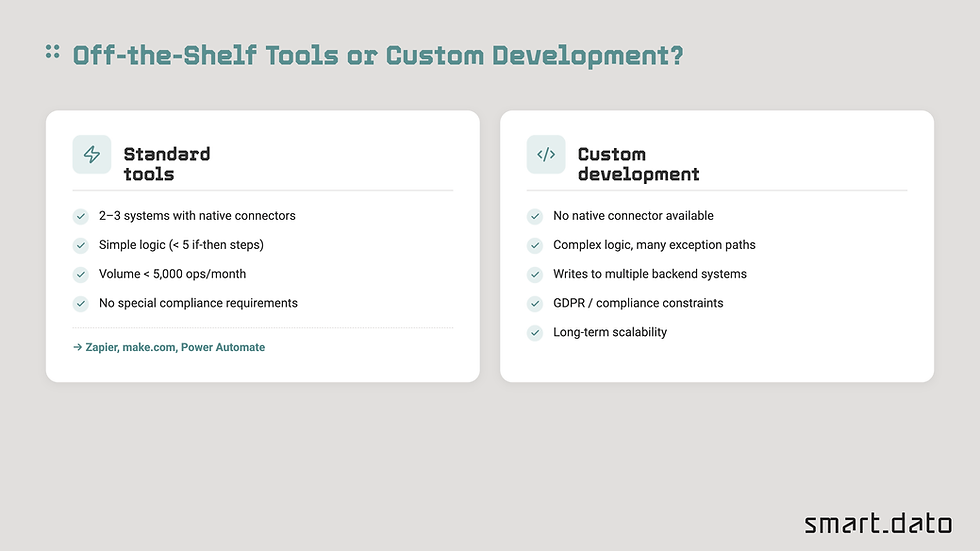
This comes up in almost every conversation about business process automation. The honest answer:
Standard tools work well when:
Two or three systems are involved and all have native connectors for Power Automate, make.com, or Zapier
The logic is simple (fewer than five conditional branches)
Data privacy requirements don't mandate on-premise processing
Monthly operation volumes stay within SaaS tool limits
Custom development is the right call when:
Systems involved have no native connectors (many ERP systems, legacy software, industry-specific platforms)
Logic is complex with many exception paths
Outputs need to write into multiple backend systems simultaneously
The solution needs to scale without increasing per-operation costs
GDPR or industry compliance requirements restrict data routing through third-party cloud services
Getting Started Without a Massive Project
The most common mistake isn't automating too little. It's starting with the wrong process — usually the one that sounds impressive rather than the one that's costing the most time right now.
Three steps for a realistic start:
Pick a process, not a platform. Which workflow costs your team the most time every day? That's the starting point — regardless of which technology ends up being the right fit.
Document the process before talking about tools. Trigger, participants, decision steps, exceptions, output. A process you can't document can't be reliably automated.
Start small, measure everything. A first automation step doesn't need to cover the entire workflow. Automating just the attachment-filing step in Workflow 1 can save an hour daily — and demonstrates to the team that this works before investing in something larger.
If you're unsure where to start, get in touch. We run a structured analysis workshop that maps your current processes and identifies the automation candidates with the highest ROI — before any development is commissioned.
Frequently Asked Questions
How much does business process automation cost?
It depends heavily on the process and technical complexity. Simple routing logic with low-code tools can start from a few thousand euros. Complex integrations with ERP connections and exception handling typically run €15,000–€50,000, with an ROI that's straightforward to calculate against the staff time recovered.
Can processes be automated without API access to existing systems?
Yes, with caveats. RPA tools can operate existing interfaces without API access. This is a valid short-term approach, but not a sustainable one: any UI change requires bot updates. Long-term planning means investing in proper interface integration.
How long does it take to implement a first automation workflow?
For a clearly documented, rule-based single process with available system integration: 4 to 8 weeks. For more complex workflows with multiple systems and exception handling: 2 to 4 months.


This is a helpful article with useful information. I recently checked a shopify development agency and found their approach impressive.