Shopware B2B Suite Integrations (ERP, PIM and Logistics): What You Need to Plan in 2026

Updated: Apr 27
Shopware is a strong choice for European B2B commerce, especially when your Shopware B2B suite shop is part of a wider ecosystem: an ERP system, PIM, WMS/logistics, CRM systems, translations, and often offline sales. In real projects, success depends less on themes or plugins and more on how well you design integrations, data ownership, and the day-to-day operational workflows your customers rely on.
This guide explains what to plan before development: which system should be the source of truth for pricing, stock, and customer accounts; how to sync product data from a PIM; how shipping, returns, and refunds should work; and which technical approach (direct API vs middleware) reduces long-term risk, so you can stay ahead as market conditions change. You’ll also get a practical discovery checklist to choose the right tools for your business.
If you’re still deciding between platforms, start with our full comparison: Shopify vs Shopware vs Custom.
Best for: B2B companies with ERP-driven pricing/stock and complex roles
Big risk: unclear source-of-truth across systems
Outcome: fewer disputes, fewer support tickets, scalable operations
When Shopware B2B Suite is the right solution
Shopware B2B suite is typically the right fit when your business operations require real B2B logic: company accounts with multiple buyers, employee accounts, role permissions and approvals, complex catalogs, multilingual expansion, and custom pricing that must match your ERP system and logistics reality. If your sales team already runs pricing, stock, customer terms, and invoices through ERP, Shopware becomes the commerce layer that makes those business processes usable online for customers.
It’s usually not the best first choice if you’re launching a simple catalog with a small operational team and minimal integration needs. If your B2B is basically a gated price list without workflows, and you have no ERP dependency, you may not need the full B2B Suite complexity yet especially if your business operations are still straightforward.
Either way, the biggest success factor is the same: integration planning. B2B customers expect accurate pricing, reliable inventory management, clear delivery status, and smooth returns—especially under real market conditions.
What Shopware B2B suite means in real projects
In practice, Shopware B2B suite is a bundle of capabilities that makes a shop behave like a B2B portal: company accounts, buyer roles, employee accounts, customer groups, negotiated pricing, approvals, order templates, and workflows that match procurement-style buying. It’s built for B2B ecommerce where customer experience is shaped by roles, permissions, and repeat ordering—not a one-click B2C mindset.
But B2B Suite features are only half the story. Customers don’t care where pricing rules live—they care that prices are correct, stock is reliable, and orders move cleanly into the systems your team already uses. That’s why most B2B Suite implementations become integration projects by default: the shop must reflect ERP reality, support a self service portal, and stay consistent with internal business processes, especially when there are specific requirements and unique requirements across different customers.
B2B Suite enables B2B workflows. Integrations make them trustworthy.
The integration landscape: ERP, PIM, logistics, CRM (and who owns what)
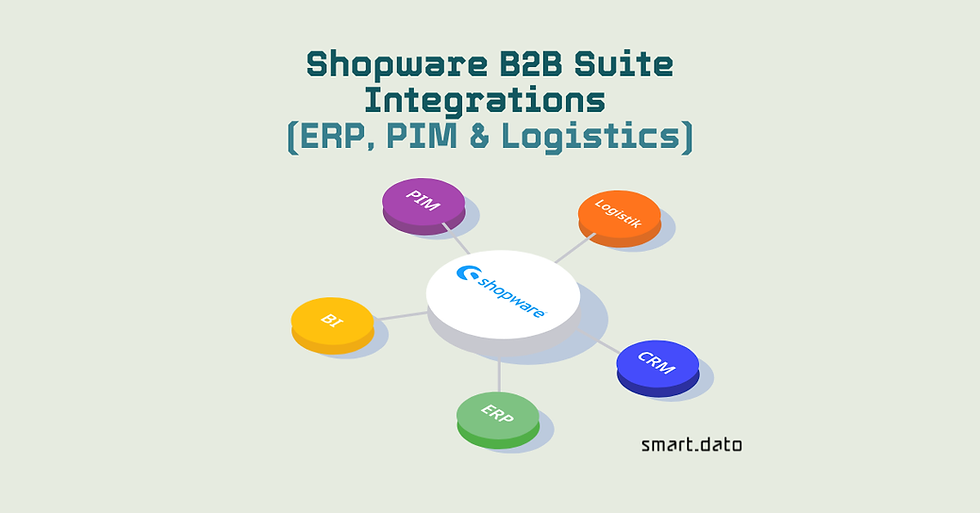
Before you choose tools or start writing a code, map the ecosystem around your Shopware shop and the existing system landscape. Typical systems include: ERP, such as pricing, stock, customers, invoices, PIM, such as product data governance, WMS/logistics which include shipments, tracking, returns, CRM (accounts and sales context), and sometimes POS/offline systems.
Use this data ownership table to decide who owns what, how often it syncs, and where integration failures typically happen.
Domain | Source of truth | Sync type | Typical failure | How to prevent |
Customer accounts & contracts | ERP / CRM | Batch + event updates | Duplicate accounts, wrong terms | One ID strategy + ownership rules |
Pricing & discount structures | ERP | Real-time or cached | Wrong invoice vs online price | ERP calculates, Shopware displays |
Inventory availability | ERP or WMS | Near-real-time | Overselling, support overload | Availability rules + fallbacks |
Product content & attributes | PIM | Batch | Catalog chaos, missing fields | Validation rules + publishing gates |
Order status & shipping events | WMS / logistics | Event-based | No tracking / wrong delivery status | Standard status mapping + monitoring |
Returns / credit notes | ERP / WMS | Event-based | Unclear refunds / disputes | RMA flow + clear customer visibility |
In B2B projects, the biggest delays rarely come from Shopware development itself, they come from unclear ownership, missing ID strategies, and integration error handling that wasn’t planned upfront.
Rule of thumb: the more systems involved, the more your Shopware B2B project becomes an integration + operations project.
The most common integration failure is unclear ownership: two systems own the same customer data and overwrite each other. Decide a source of truth per domain:
Pricing and payment terms is often ERP
Inventory availability: ERP or WMS
Product content and attributes: PIM
Customer accounts and contracts: ERP/CRM
Order status and shipping events: WMS/Logistics
Once ownership is defined, you can plan sync direction, frequency, and error handling to ensure seamless integration. Without that, projects drift into endless edge cases and “manual fixes” that destroy B2B trust.
Integration pitfall 1: Two sources of truth for pricing What happens: The online price doesn’t match the invoice, discounts apply inconsistently, and sales teams end up fixing exceptions manually. Prevent it: Make ERP the single pricing owner. Shopware displays the price (real-time or cached). Define caching rules and a fallback for temporary ERP downtime.
Integration pitfall 2: Inventory sync timing What happens: Overselling, unexpected split deliveries, and a support overload when availability lags behind incoming orders. Prevent it: Use near-real-time sync for critical SKUs and high-volume items, and add a clear fallback like “stock on request” when systems are under load.
Shopware B2B portal with integrations
If you’re planning a Shopware B2B portal with ERP/PIM/logistics integrations, see how we build B2B shops end-to-end
ERP integration for Shopware B2B Suite: pricing, stock and inventory management
Most B2B suite projects succeed or fail on ERP alignment. This section shows how to connect pricing, availability, and order flows so the Shopware shop reflects your ERP/CRM reality and supports day-to-day operations as a modular system for digital transformation.

Customer specific pricing vs custom pricing: what ERP controls (and what Shopware controls)
In B2B, ERP is usually the commercial brain: customer-specific prices, discounts, credit terms, contract catalogs, and discount structures. Shopware should not “guess” these values. Decide early whether Shopware calculates prices or whether it requests them from ERP. For many wholesalers/manufacturers, the safest approach is: ERP calculates, Shopware displays.
Real-time vs batch sync: what needs to be instant for inventory management
Not everything must be real-time. Stock and pricing often need near-real-time updates to avoid disputes (“your site said it was available”). Product attributes and content can often be batch-updated daily. Orders should be sent immediately to ERP after confirmation, and order status should flow back to Shopware to reduce support load and improve inventory management.
Plan for failures (because failures will happen)
B2B integrations must handle partial failures: ERP downtime, delayed updates, duplicate requests, mismatched IDs, and “impossible” combinations of customer terms. Define retry logic, logging, and clear fallbacks (e.g., show “price available after login” or “stock on request” when ERP is temporarily unavailable). This is the difference between a stable B2B portal and a support nightmare, especially when multiple employee accounts depend on reliable ordering.

PIM integration for Shopware B2B ecommerce
If ERP keeps commerce truthful, PIM keeps it clean. This is where you protect data quality, reduce manual work, and scale into new markets without breaking internal workflows.
What should sync from PIM into your ecommerce solution
A PIM should be the governance layer for product data: titles, descriptions, attributes, variants, categories, media references, translations, and sometimes enrichment rules. Shopware should consume clean product data rather than becoming the editing system for everything. This is especially important when you need consistent presentation across different customers and channels.
Data quality rules to unlock full potential
Define mandatory fields and validation rules before publishing into Shopware: required attributes per category, image standards, unit formats, and translation completeness. In B2B, incomplete product data leads to sales friction and higher support effort. PIM and Shopware works best when PIM governs, Shopware sells.
Logistics/WMS and returns for B2B commerce
This section focuses on partial shipments, RMAs, and credit flows so customers can self-serve status without support tickets. It’s also one of the most important b2b components for reducing manual work.
Shipping and tracking workflows
In B2B, shipping is rarely “one order → one parcel.” You may have partial shipments, backorders, split warehouses, and different carriers per region. Plan how shipping labels, tracking numbers, and delivery statuses appear in Shopware so customers can self-serve updates without emailing your team.
Returns & refunds in B2B reality
Returns can be even more complex: RMAs, return reasons, restocking rules, credit notes, and approval steps. If returns are handled in a separate logistics system or ERP, Shopware needs the right touchpoints: generating return requests, tracking return status, and displaying refund/credit outcomes clearly, especially when bulk ordering is common. When returns aren’t integrated, operational cost rises fast and customer trust drops.

API first integrations with third party systems: direct API vs middleware
Shopware offers flexibility in how you integrate - direct connections or a central layer. The right choice depends on how many third party systems you have, how often rules change, and how quickly you need to ship new features. It is a critical b2b components decision for long-term scale.
Direct API integrations (Shopware ↔ ERP/PIM/WMS) can work for simpler ecosystems. They’re faster initially but can become brittle as requirements grow, because every new rule creates new dependencies between systems.
For B2B projects with multiple systems, an integration layer (middleware/iPaaS) is often the scalable approach. It centralizes mapping, retries, monitoring, and orchestration. This reduces logic spread across systems and makes onboarding a new system (new WMS, new PIM) far less painful.
A good rule is that the more systems you have and the more frequently rules change, the more you should consider middleware. This also makes ongoing support easier because failures are visible and traceable in one place.
Roles, permissions, approvals: the B2B Suite experience layer
This is where Shopware offers the portal-like experience buyers expect: multiple users, approvals, and rules that mirror procurement. Done right, it supports adoption and reduces manual work for sales teams. It’s a flexible platform for role-based processes—and one of the most visible b2b components for buyer experience.
B2B customers don’t behave like single consumers. They buy as companies with multiple roles: buyer, approver, finance, warehouse. Shopware B2B Suite projects should define role-based access (RBAC) early: who can see prices, who can place orders, who can approve, who can reorder templates. In many projects, buyer rules are configured using a rule builder to control permissions and conditions.
If your roadmap includes B2C as well, our B2C shops service overview is here.
Approval workflows reduce errors and support real procurement behavior. If your sales process requires approvals or purchase orders, design that flow so it’s intuitive—and connected to the ERP rules that govern credit limits and payment terms. This is also where deep customization can matter, especially when you align the portal experience with your account structure and crm systems.
TCO and ongoing maintenance: what you’ll actually pay for
Teams often compare only implementation cost. In reality, the big cost driver in Shopware projects is integration complexity and ongoing maintenance, such as updates, hosting, monitoring, and evolving workflows.
Plan for: hosting/security updates, development for new features, integration monitoring, and periodic optimization (performance, SEO, content operations). If you need predictable operations, design for maintainability: clear ownership, stable interfaces, and monitoring from day one.
The cheapest build is rarely the cheapest system to run.
Planning checklist
You can use this checklist that we prepared:
Define source of truth for: pricing, stock, customers, products, order status, returns
Document key flows: login/pricing, availability, checkout/PO, order sync, shipping updates, returns/credit notes, order processing, and order history
Decide sync type per domain: real-time vs batch
Define ID strategy: product IDs, customer IDs, order IDs, contract price identifiers
Error handling: retries, queues, fallbacks, logging, monitoring ownership
Security: authentication, permissions, environment separation (dev/stage/prod), rights management
Performance: cache strategy, API rate limits, peak load assumptions for large catalogs and shifting product assortments
Go-live plan: data migration, cutover, rollback plan
Post-launch: who owns updates, bug fixes, and new integration needs as market conditions shift
Next step: plan your Shopware B2B integrations with a clear architecture
If you’re considering Shopware B2B suite, the best next move is a short discovery to map your systems, define data ownership, and validate integration scope before implementation begins. That single step prevents most timeline slips and “hidden cost” surprises later for customers especially in b2b commerce and b2b ecommerce.

FAQs
Is Shopware B2B Suite worth it for manufacturers?
Yes, if your sales model needs real B2B portal logic: company accounts, multiple buyers, employee roles, approvals, customer-specific pricing, and ERP-driven stock/terms. It’s especially worth it when your customers expect accurate availability and pricing that matches invoices.
If you sell a simple gated catalog without workflows or deep integrations, a lighter B2B setup may be enough until complexity grows.
Do we need middleware for Shopware integrations?
Not always. Direct API integrations can work well when you have 1–2 core systems and stable rules.
Middleware becomes the better choice when you have multiple third-party systems (ERP + PIM + WMS/CRM), frequent rule changes, or you need monitoring, retries, and reliable error handling in one place.
How long do Shopware B2B integration projects take?
It depends mainly on integration complexity. As a practical range:
4–8 weeks if scope is focused and integrations are limited ( for example, ERP and basic catalog sync)
8–16+ weeks when you add PIM governance, WMS/returns flows, role workflows, and more edge casesA short discovery phase upfront usually saves weeks later because it locks down data ownership, sync strategy, and failure handling.
What’s the biggest risk in ERP integration?
The biggest risk is unclear source of truth, when both Shopware and the ERP can change pricing, customer terms, or availability. That leads to invoice mismatches, disputes, and manual fixes.The second most common risk is missing failure handling. Planning caching, fallbacks, and monitoring upfront prevents most post-go-live issues.
Ready to map your integrations and scope the Shopware B2B suite correctly?
Talk to us about your project

Nice overview of Shopware B2B suite integrations. For any B2B operation, keeping digital and physical inventory in sync is a real challenge. That’s exactly why I look here to track every pallet, tool, and piece of equipment with QR codes and mobile scanning. When your integration pulls from accurate physical asset data, stockouts and misplaced gear become a thing of the past. Thanks for sharing.
Sakura Jaya Solusi manages office equipment with functional structure. Devices are prepared for daily use. Service depends on area.